
Online safety is of utmost importance today, and there are some simple ways of protecting your devices from such attacks.
Malware and Viruses can enter your devices through scamming
- Emails,
- Websites,
- Downloads
Let’s tackle them one by one-
Emails
Verification Emails
One often receives verification emails where a link has to be clicked to verify your device or enter your password. Check the email address for all such emails. Any company worth their salt will have an @companyName.com address. A general @gmail.com address is most likely fake. Report it as spam.
Reporting Emails as Spam
This may seem like a small thing, but Google, Yahoo and other email services learn to identify emails as being spam automatically, from your input. This takes a second to do, but will drastically reduce chances of being a target of an online attack, as you will eventually stop seeing those spam emails altogether.
Downloading attached files (specially .zip, .rar, and other large files)
If the sender is unknown, and not a reputable source (i.e. a company email), as a rule of thumb, do not download any files attached to such emails. Gmail checks for viruses in data, but cannot do so for large files like video files, or inaccessible files like .zip/.rar. These files cannot be scanned, and most corrupt code resides in such files. If the email was unexpected, don’t open the files at all!
Websites
http vs. https
One often hears that a website with https:// and the lock symbol beside it, is secure. And yes, that is true to a certain extent. But, in the next section, we will look at an example where the website has https, and a lock symbol beside it. Yet, it is a known to be fake.
Clearly https does not guarantee that your website is secure. So, what does it actually mean?
The https is added to a website name, when its owner, buys an SSL certificate. In simple terms, an SSL certificate verifies to the user, that the information being sent to the website, is encrypted. Therefore, no middlemen can access it or take advantage of it. But here’s the catch, this assumes that the site you are sending the information to, is legitimate. But when the website itself is dubious, the SSL certificate simply means that you are sending your information extremely safely, to the hackers.
Phishing Scams
Phishing is when a person sends a link to a fraudulent website that looks real, to collect information. An example would be, faking the Facebook login page, and sending you the link in an email, pretending to be Facebook. Use the email tips above to make it such, that you figure out the scam before clicking on the link. But it often happens that one forgets to check it. Let us continue with the Facebook example.
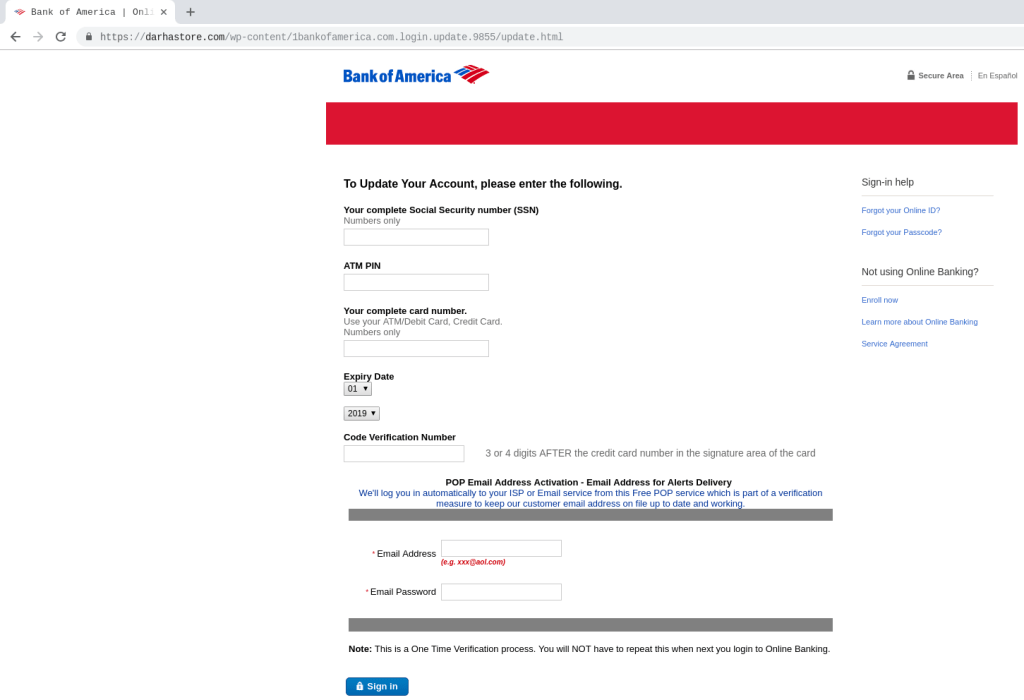
So, you clicked on the link, do not worry, you do not automatically get hacked. If the link tries to download something as soon as you click on it, delete the download, and report the email as spam. But more often than not, the link takes you to a website that looks official. Now, look at the website name in the top of your browser. If it is not facebook.com/randomthings, it’s probably dubious. But here’s the catch, the website name in the address bar could have Facebook in it, and the website could still be dubious. Here is an example of a fake Bank of America Login Website-
https://darhastore.com/wp-content/1bankofamerica.com.login.update.9855/update.html (DO NOT VISIT)
But look at the address, it has bankofamerica.com in it, but that is not the primary website name, the main website is the darhastore. It is difficult to differentiate at a quick glance, especially when some sites are much better than this one, at hiding their actual names. Some websites will put the fake name before the real name. So, it could be bankofamerica.com/actualusername.com. In this case, it’s much more difficult to tell, isn’t it?
So, how to deal with this?
Browsers like Google Chrome automatically highlight the real website name for you. Always look at the highlighted name before giving any information.
Here is the same example of a fake Bank of America website. Because of the highlighting done by Chrome, it is clear as day, that this website is fake. Here’s the same site, with highlighting
https://darhastore.com/wp-content/1bankofamerica.com.login.update.9855/update.html (DO NOT VISIT)
For safari, you can choose to show just the main address by,
Safari in toolbar -> Preferences -> Advanced -> Untick "Show full website address"
Here is how that would look in Chrome-
Downloads
Downloads are particularly dangerous since they already have access to your devices since they’re stored on them. Once that happens, it’s easy to collect information in the background. Most of these viruses come through downloads from piracy websites which provide free downloads for songs, movies, games, and other applications. Most of the viruses are but a random file in the plethora of files that are a part of the app that we download. For example, how many of us actually check the files added during the installation of Microsoft Word? Even if we did check, there’s no way of knowing if one of the files is a virus.
Most big files are downloaded as .zip/.rar, are especially harmful. Since most anti-virus softwares cannot scan them, avoid those files particularly. If you do end up downloading a zip file and extracting it, manually have the anti-virus software scan the extracted folder. And permanently delete and suspicious files it finds.
Hence, never download files from random websites, torrents or as attachments from unknown email senders.
The biggest takeaway
Anti-virus software alone will not protect you from everything; hence it is essential to know some tricks that keep you safer with or without it.
This is because security software is always playing catch-up with the most recent malware and viruses. New exploits come about, and companies find and implement ways to stop those exploits. Thus, at any given point, there is a virus/malware that no anti-virus can detect or prevent. So, despite doing all this, there might be a new hack that can bypass everything given above.
But it’s not all bad. As long as we keep ourselves away from suspicious websites, and keep an eye out for them, we will remain safe.

 Aamod Pant Balekundri
ornate! Reports Detail [Economic Impact] of [Recent Occurrence] 2025 grand
LikeLike